01 / Direct access
The library runs in the shared workspace.
Geospatial functions are available as a Python API. These domain computations require no additional MCP server.
SpatialAgents QGIS plugin
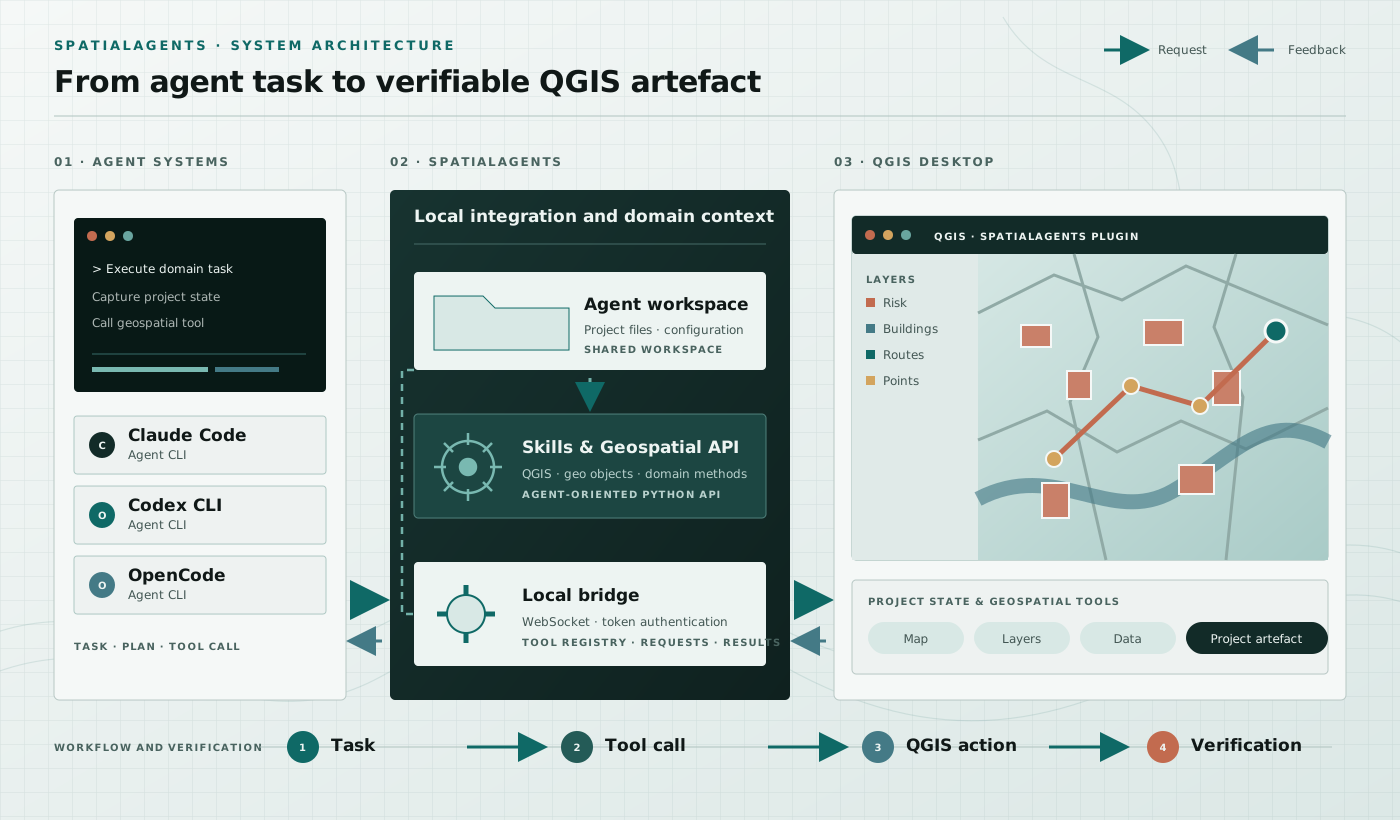
The plugin connects the open QGIS project state with Codex CLI, Claude Code or OpenCode. Each of these agent systems can launch multiple SpatialAgents. Tasks, tool calls and results move through a local, token-authenticated bridge. The language model can also be one operated entirely locally — Benchmark 08 documents this with 83.7 of 100 points on a notebook.
The fundamentals explain tool use, MCP, skills and planning in thirteen sections.
Architecture
The agents and QGIS use the same project files. Spatial computation is performed in the workspace; the plugin handles controlled interaction with the open QGIS project.
The participating agents receive the domain task and reads layers, map extent, project structure and available tools.
Skills and the Geospatial API support acquisition, analysis and processing. Results are created as files in the shared workspace.
The bridge loads layers, styles maps, navigates the project and exports project or layout artefacts.
Screenshots, layer information and generated files return to the participating agents and inform the next step.
Geospatial API for AI agents
The Geospatial API is part of SpatialAgents. Coding agents import it directly in the workspace and use their native abilities for code generation, execution and verification.
01 / Direct access
Geospatial functions are available as a Python API. These domain computations require no additional MCP server.
02 / Self-correction
The interface responds fault-tolerantly with structured, AI-specific messages, correction hints and appropriate alternatives.
03 / Recursion
Feedback from spatial tasks flows back into the API, tests, benchmarks, documentation and agent skills.
Local data flow
The bridge runs locally, authenticates connections with a token and provides defined QGIS operations. Compute-intensive processing remains in the shared workspace.
Application evidence
SpatialAgents Benchmark 08 documents the complete prompt, assessment criteria, generated geodata, maps, charts and portable QGIS project.